npm Dependency Firewall
A trusted npm dependency can become risky with a single new release. Bytesafe blocks malware, packages with known vulnerabilities and policy violations before they reach your build. New releases can also be delayed, reducing exposure before malicious packages or vulnerabilities are identified.
Dependency Firewall sits in front of your existing repository, protecting developers, CI/CD pipelines and AI agents.
EU-based company · Software supply chain security since 2018.
Logs
| Time | Status | Package | Version | Rule |
|---|---|---|---|---|
| 09:58:15 | Allowed | minimist | 1.2.5 | Exception |
| 09:58:12 | Blocked | nx | 21.6.4 | Delay 7 days |
| 09:58:09 | Blocked | lodash | 4.17.20 | Block CVSS ≥ 7 |
| 09:58:06 | Allowed | express | 5.1.0 | Log all downloads |
| 09:58:03 | Blocked | event-stream | 3.3.6 | Known malware |
| 09:58:00 | Allowed | react | 19.1.1 | Log all downloads |
| 09:57:57 | Allowed | sass | 1.102.0 | Log all downloads |
| 09:57:54 | Allowed | autoprefixer | 10.5.4 | Log all downloads |
Intercepts every npm package request before it reaches you.
Every package install is a potential entry point. Traditional SCA tools find problems after packages are already in your environment. Dependency Firewall intercepts every npm request before it reaches your developers, CI/CD pipelines or AI agents.
You define the rules: block packages with known CVEs, block known malicious packages, or delay newly published versions for a configurable period to give the ecosystem community time to surface zero-day threats.
Works in front of enterprise repository platforms and any npm registry. No agent installs. No workflow changes.
Public npm registry
Vulnerable and malicious versions included

Dependency Firewall
Policy engineDevelopers and CI/CD
Internal environment
What Dependency Firewall does for npm
Each firewall runs the checks you turn on, on every package request. Rules block or log, and every decision is recorded.
- Malware blocking
- Blocks packages that match malware data, including malicious payloads and suspicious install hooks. Every block is logged with the package and the rule.
- Vulnerability blocking
- Blocks versions with CVEs above a CVSS or EPSS score you set, per firewall. New advisories apply on the next request.
- Package delay
- Holds newly published versions for a window you set, so malware feeds can catch a bad release before your builds install it.
- Time-limited exceptions
- Unblock one package or version with a reason and an expiry date. The rule keeps applying to everything else, and the exception lapses on its own.
- Dependency confusion
- Upstream priority rules make internal package names always resolve from your private registry. A public package with the same name cannot take its place.
- Package observations
- Every package that passes records first-seen and last-seen time and request counts. When a new advisory lands, you see which firewalls served the package and since when.
- Audit log
- Every allow, block and exception is logged with the package, version, rule, requester and time. Export it to your SIEM.
- A firewall per team
- Run a separate firewall per team, pipeline or registry. A shared baseline firewall runs first, and team firewalls add rules on top without weakening it.
- Trust downgrades
- Flags releases published with weaker provenance than the version before them, the pattern behind account takeovers.
- Licenses
- Blocks packages with licenses you have not approved before they reach a build.
- Rules as code
- Every firewall is a small JSON configuration. Keep it in Git, deploy it through your automation over the API and roll back to any earlier version.
- Publish scanning
- Packages are scanned for malware, secrets and sensitive data before they are published to an upstream registry.
Dependency Firewall offer
Half the base fee for your first 3 months
€49.50 instead of €99 per month, plus €100 usage credit. Start with a 14-day trial. See what's new
How npm installs go through the firewall
Your package manager asks the firewall instead of the public registry. The firewall fetches the package from upstream, checks it against your rules and serves it only if it passes.
- 1
Change the registry setting
Point npm, Yarn, pnpm or Bun at the firewall, on laptops and CI runners. Lockfiles, manifests and install commands stay the same.
Developer or CI job
npm install
Dependency Firewall
Checks your rules
Public registry
registry.npmjs.org
- 2
Set the rules
Block by CVSS or EPSS score, known malware, license or package age. Shared rules go on a baseline firewall that team and CI firewalls inherit, and they run first.
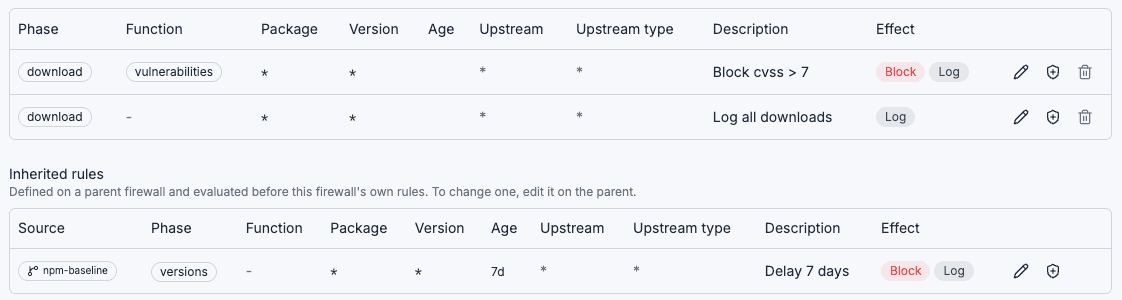
Rules on the npm-ci firewall. The 7-day delay is inherited from npm-baseline. - 3
Read the log
A version held back by a rule is left out of the version list, so the package manager resolves an older one. A blocked download fails the install. Every decision is logged with the rule and who asked.
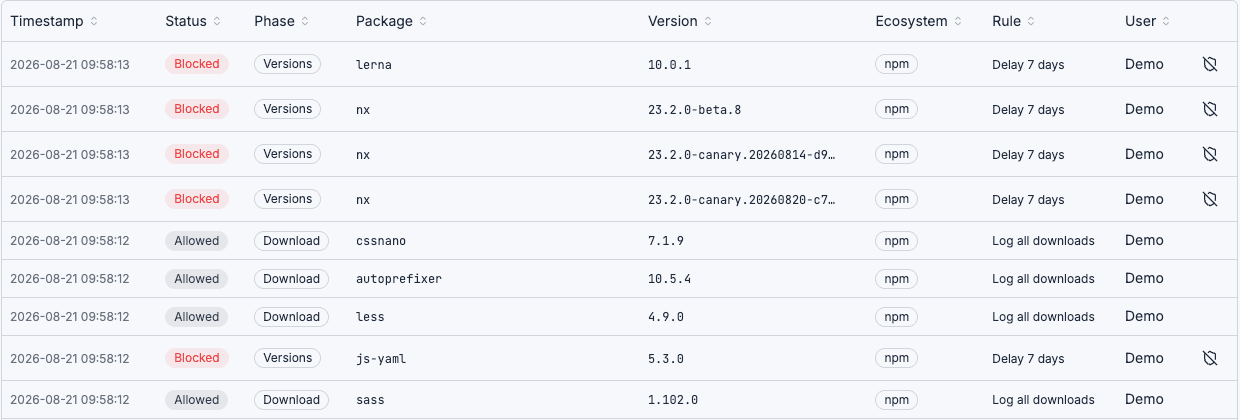
New versions held by the delay rule, next to allowed downloads.
Configure your npm proxy in one command
Point npm, yarn, pnpm or Bun at your Bytesafe Dependency Firewall endpoint. Existing package manager commands and lock files continue to work without changes.
Works with the repositories you already use
Inside Dependency Firewall
The screens your developers and security team work with.
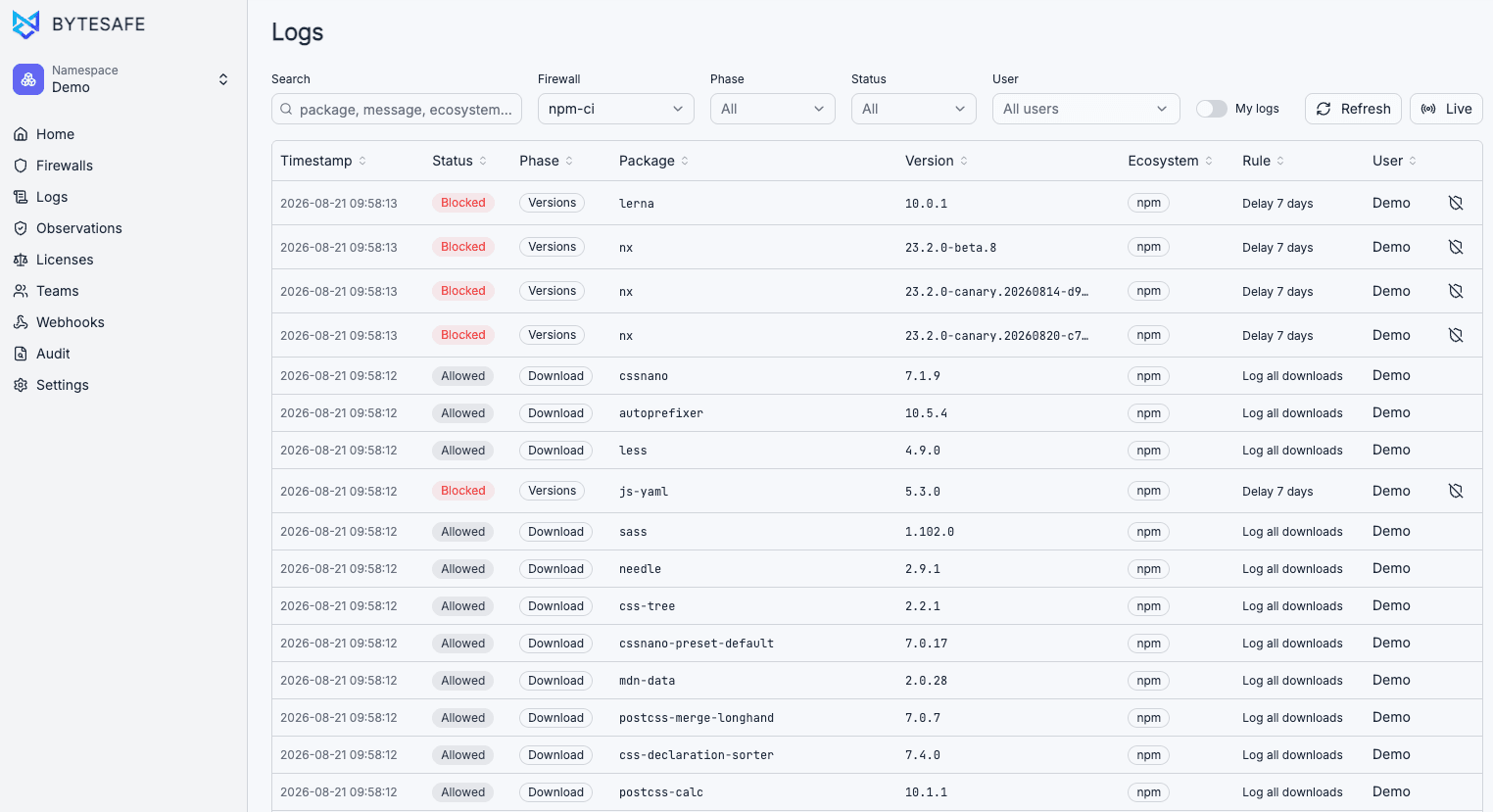
1 of 7 · Logs
Live firewall logs
Every request is logged: package name, version, status, ecosystem, which firewall evaluated it, which rule triggered and who requested it. Filter by firewall or user, and tail live during incidents or CI/CD runs.
Developers get a fast answer when an install fails, and AppSec gets an audit trail for every decision.
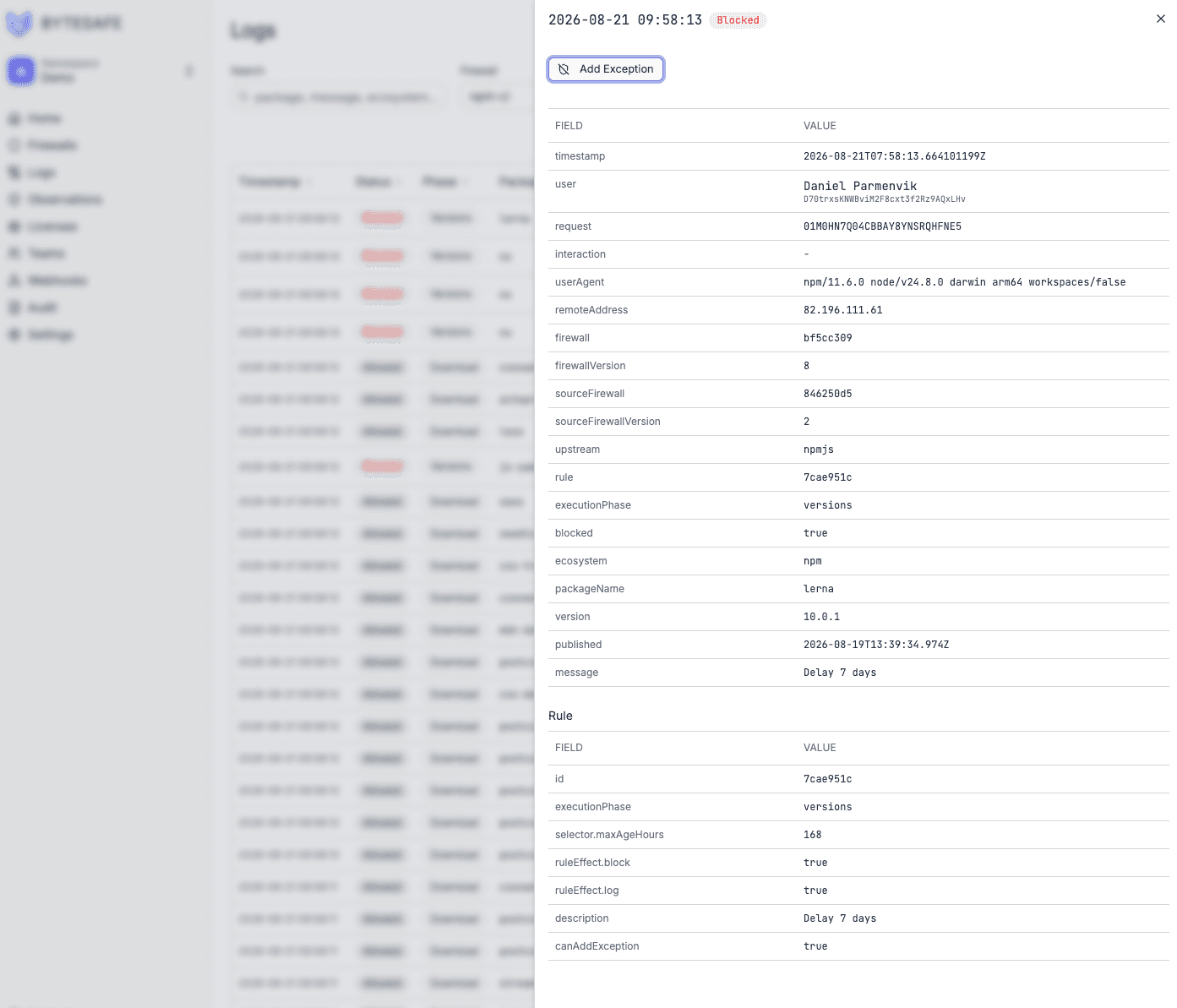
Why a package was blocked
Open a blocked request to see the ecosystem, version, publish date, the rule that triggered and whether its effect is block, log or both.
Add a time-limited exception from the same drawer to let one package or version through while the rule keeps applying to everything else. The decision stays attached to the original request, so nothing has to be reconstructed from CI output later.
Firewall rules
Each rule targets an ecosystem and applies a condition: vulnerability severity, package age, license or name pattern. Rules block or log, stack per firewall and take effect immediately.
Start with broad guardrails, then narrow by upstream, package, version range, internal status, maximum age, CVSS score and EPSS score.
See everything a rule can match on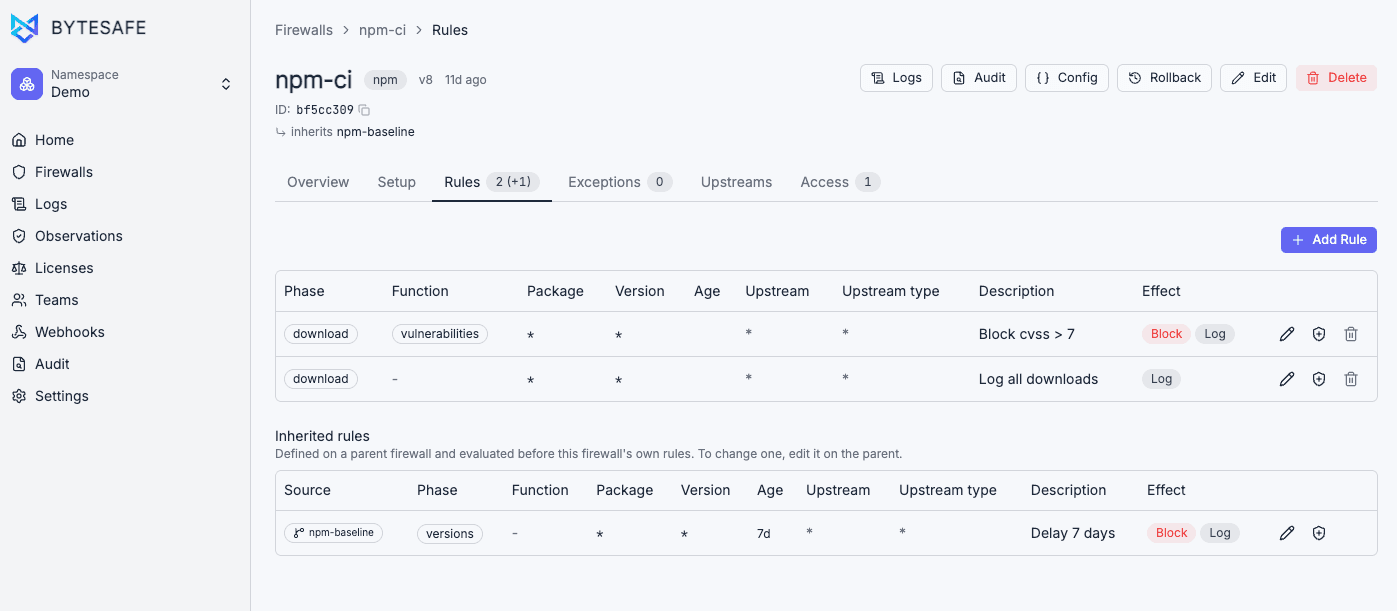
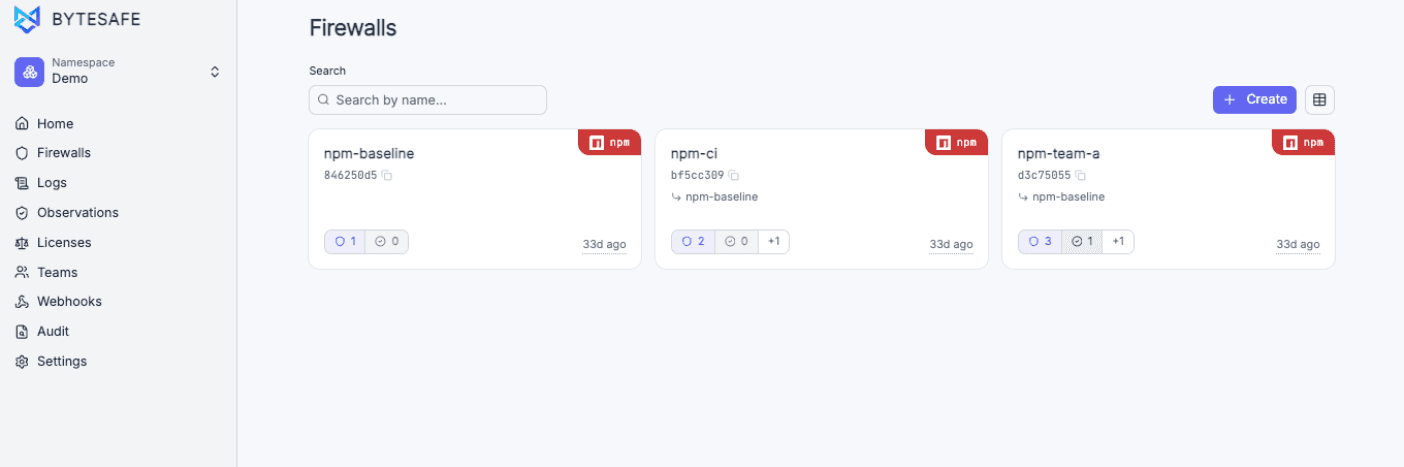
A firewall per team or pipeline
Each firewall carries its own rules, exceptions and upstreams, so a CI firewall can be stricter than a local dev one.
A firewall can inherit from another. Set one baseline with the rules every project must follow and point team firewalls at it. Inherited rules run first and can only be changed on the parent.
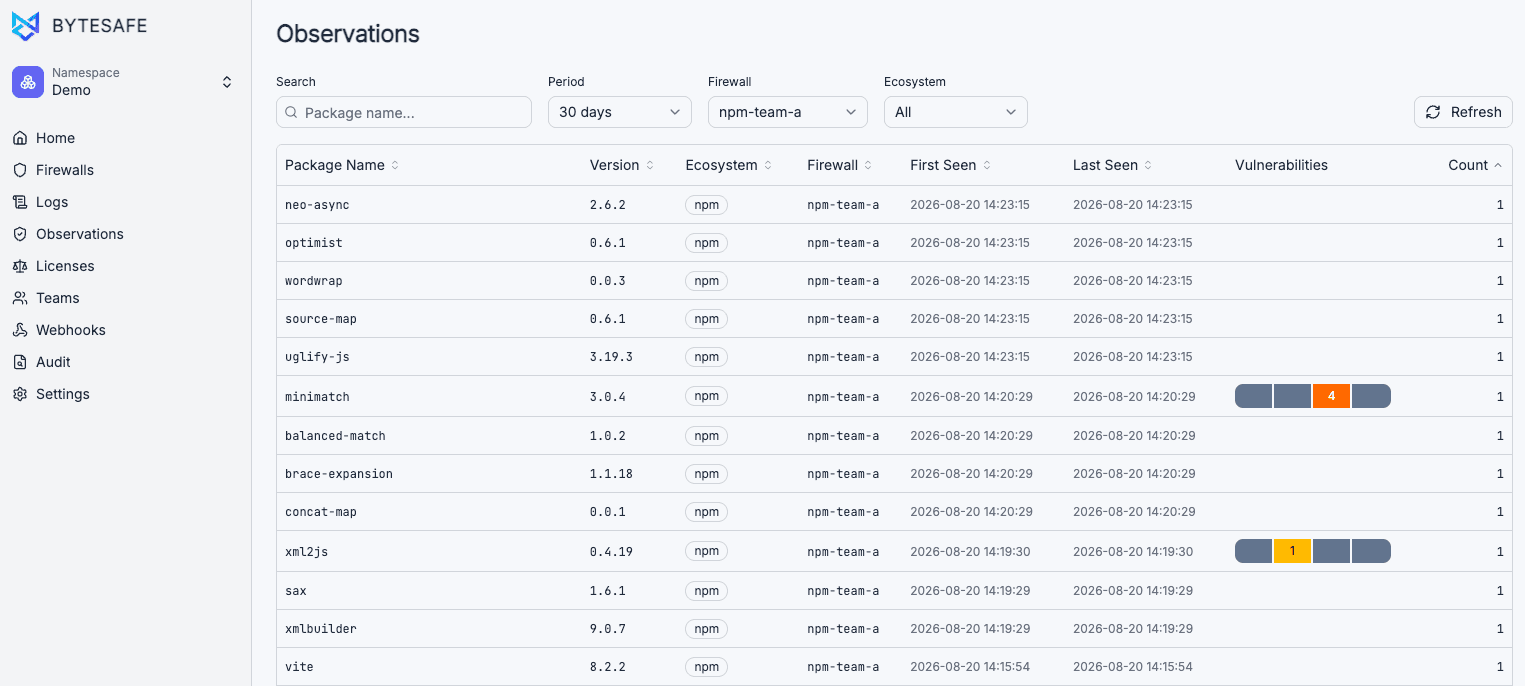
Every package that passed through
See which packages each firewall served over a period, with ecosystem, version, first-seen and last-seen time, vulnerability signals and request counts.
When a new advisory or malware report appears, search for the package and see where it was observed and when exposure started.
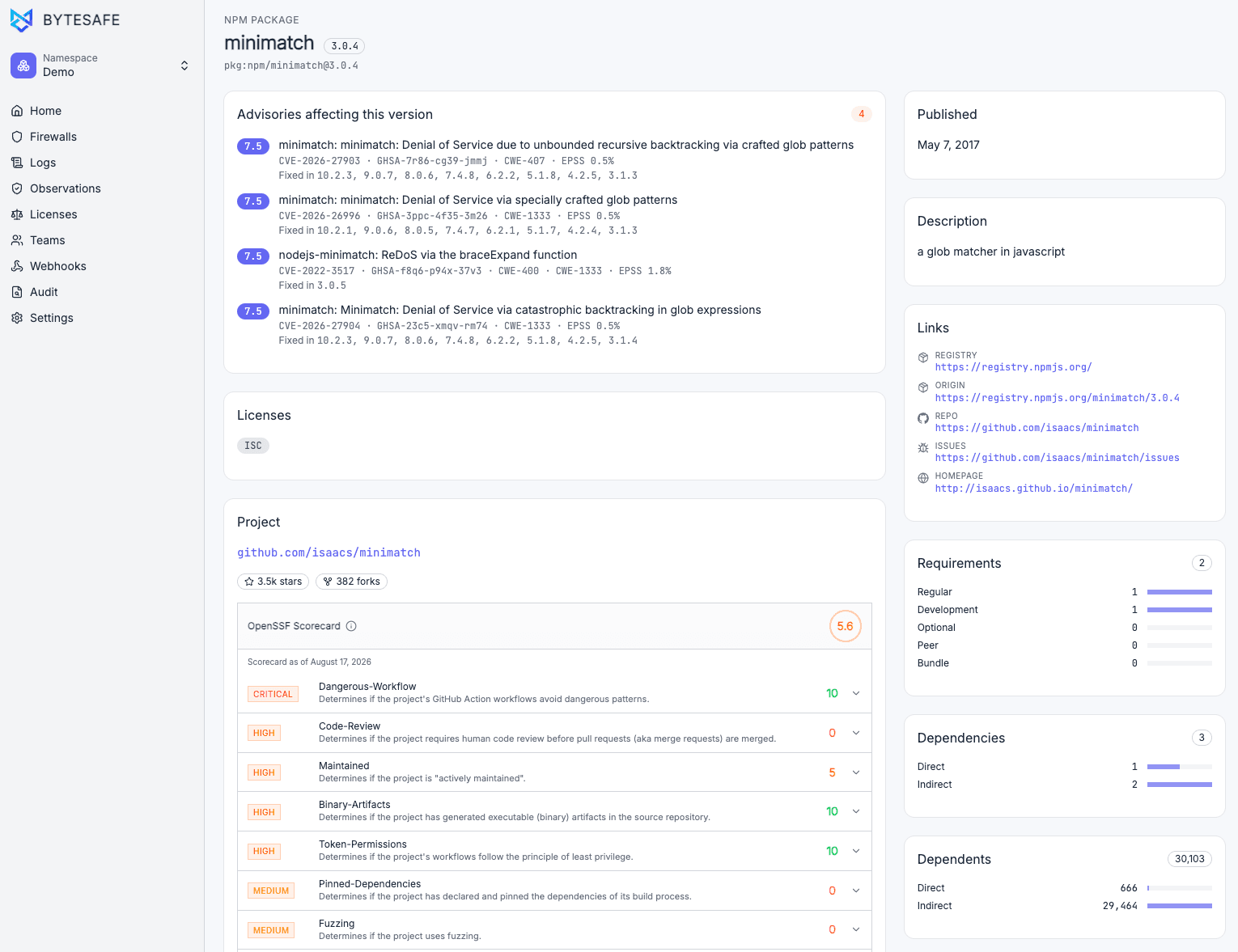
Package details and scorecards
Review advisories, licenses, project metadata, OpenSSF Scorecard checks, dependency counts and source links before you block, allow or investigate further.
Security dashboard
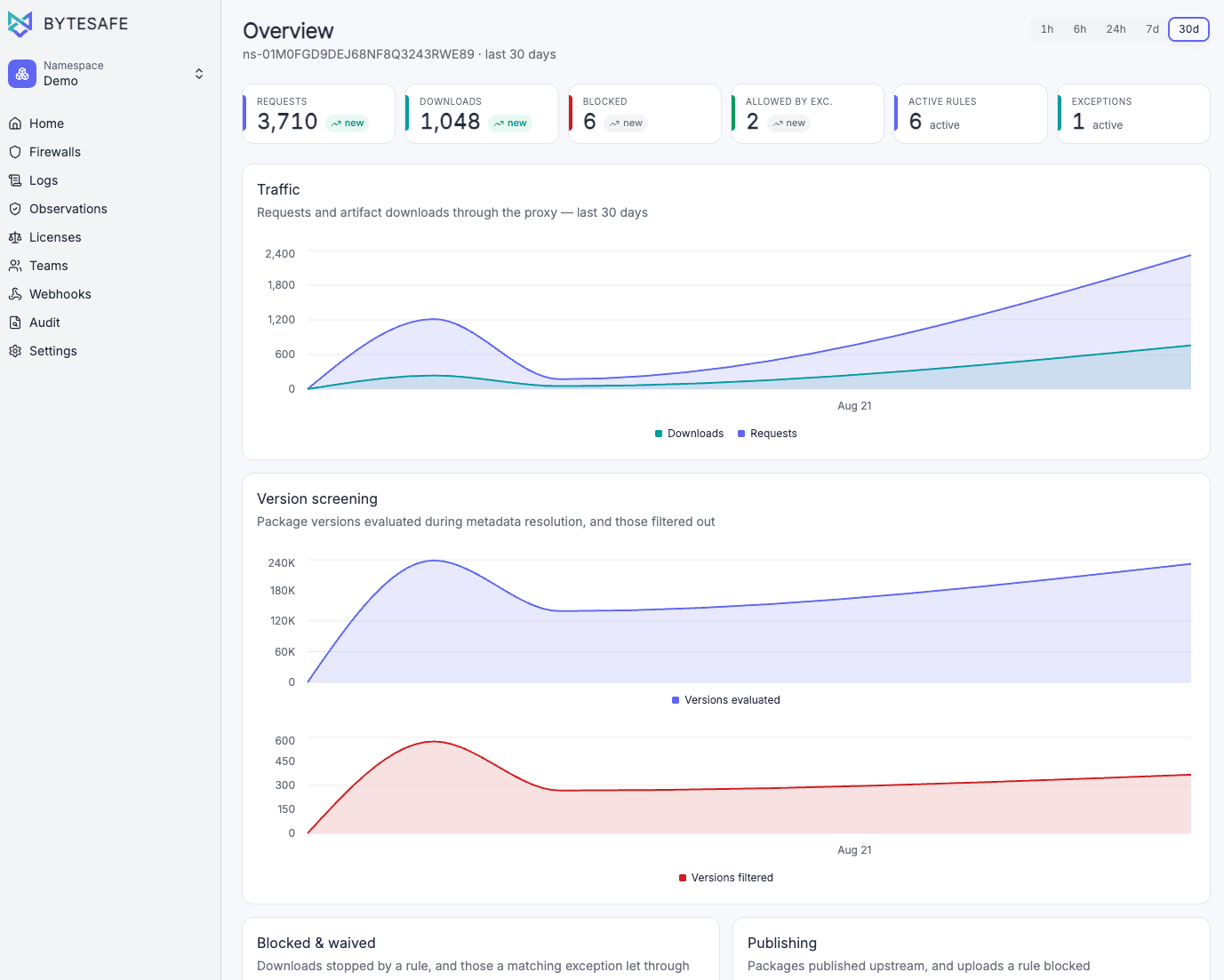
Rules triggered, exceptions granted and package requests over time. See which firewalls are most active and confirm your policies work after rollout.
Known attacks on npm
Malicious releases, account takeovers and dependency confusion have all been used against packages there.
shai-hulud
Worm
- A self-spreading worm stole npm tokens from developers who installed an infected version, then used them to publish infected versions of those developers' own packages. Hundreds of packages were hit, and a second wave followed in November 2025.
ua-parser-js
Account takeover
- An attacker gained access to the maintainer's npm account and published three malicious versions. The injected payload installed a cryptominer and a credential-stealing trojan. Over 8 million weekly downloads at the time.
event-stream
Maintainer handoff
- A maintainer transferred ownership to an unknown account. The new maintainer injected code that stole Bitcoin wallet keys from a specific Copay application. The package had 2 million weekly downloads.
colors.js / faker.js
Maintainer sabotage
- The maintainer published versions that caused applications to print infinite ANSI sequences and nonsense strings to stdout. Thousands of applications broke on upgrade without any warning.
Also blocks vulnerable and malicious container images before they reach a build agent or production node.
Container Dependency FirewallCompared with other enterprise dependency firewalls
Other enterprise dependency firewalls are often bundled into repository platforms. Dependency Firewall is an independent firewall that works with any registry and is built in the EU.
| Criterion | Dependency Firewall | Other enterprise firewalls |
|---|---|---|
| Works with your existing repository | Yes, as a proxy in front of it | Bundled into their platform most often |
| Deploys in minutes | Yes | Usually weeks of platform work most often |
| Predictable pricing | One meter sets the price, no overage | Several axes with overage most often |
| EU data residency | Yes | No, US-based most often |
Frequently asked questions
How do I configure npm to use Bytesafe Dependency Firewall?
Does it work with private npm packages?
Will it break my existing package-lock.json or yarn.lock?
Does the zero-day safety delay apply to all npm packages?
Can different npm projects have different policies?
Can npm packages be delayed before they reach developers?
What happens if a npm package passes through but malware is found later?
Can firewall rules be automated?
Does Dependency Firewall work with enterprise repository platforms?
How is licensing structured?
Bytesafe Platform
Software Supply Chain Security and Transparency
Three products that block risky packages at install, collect supplier transparency documents, and analyze them.
Dependency Firewall
Block vulnerable and malicious packages before they reach your developers. Sits in front of your existing repository.
You are on this pageTrust Repository
Collect SBOM, VEX and end-of-life documents from your suppliers, and publish your own to your customers.
Product pageSBOM Observer
Analyze SBOMs from your builds and suppliers for vulnerabilities, licenses and policy violations. Keep a record per release.
Product page
Put npm installs behind the firewall
Try the setup above on one project and check the firewall log after the next install. Or book a demo and go through your registries and rules with an engineer.